
What Does an Azerbaijan e-Visa Look Like?
The approved Azerbaijan e-Visa is a single-page, A4-format PDF document issued electronically by the ASAN Visa system. Once your application at evisa.gov.az is approved, this document arrives in your email inbox as a PDF attachment and is also available for download through the portal itself.
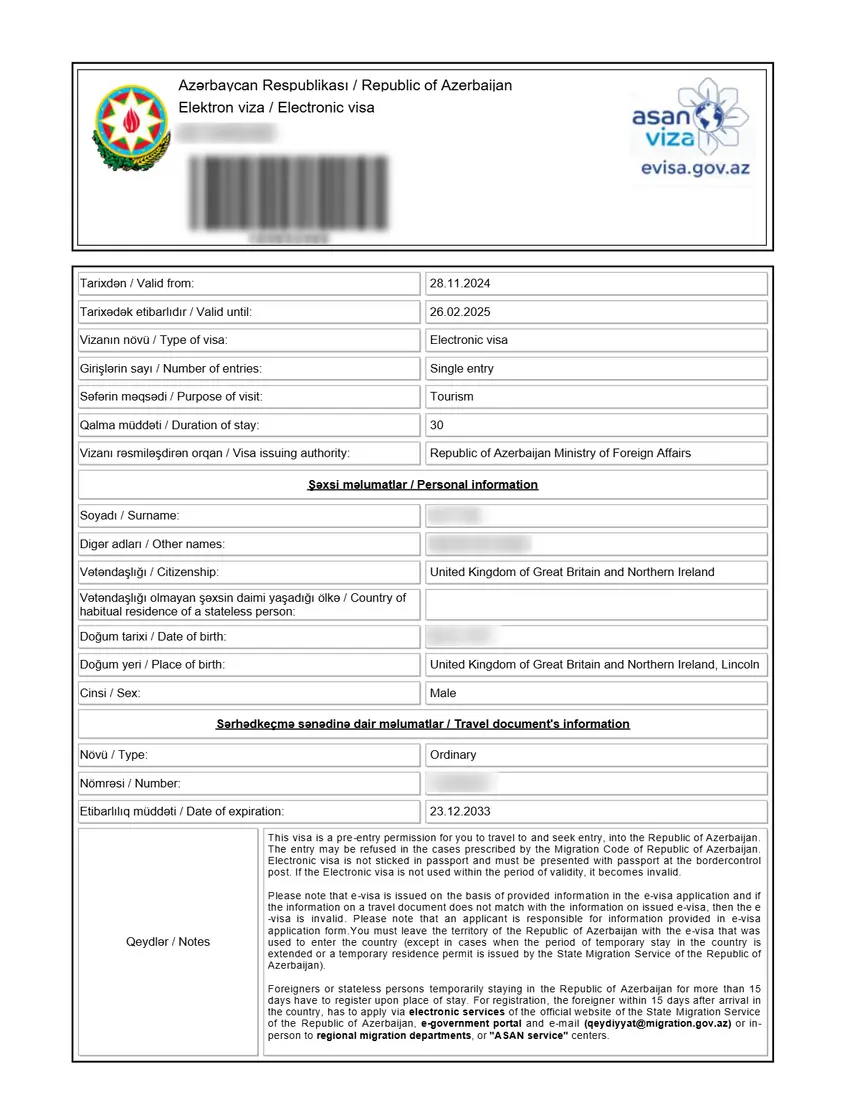
Here is what the document contains at a glance:
- Your full name, date of birth, and nationality as entered in the application
- Your passport number and passport expiry date
- Visa category (typically “Ordinary” for tourist e-Visas)
- Number of entries permitted (single or multiple)
- Issue date and expiry date, with a validity window of 90 days from issuance
- A unique reference number (alphanumeric code and barcode)
- A machine-readable QR code in the upper-right corner of the document
- Header and seal of the Republic of Azerbaijan, Ministry of Foreign Affairs
Think of it as the digital equivalent of a traditional visa sticker – except instead of being placed in your passport, it is delivered as a standalone PDF you carry alongside it. The Azerbaijan e-Visa system was designed for self-service, so the document layout is clean and readable for both you and the border officer who will review it.
Key Fields on Your e-Visa Document
Every approved Azerbaijan e-Visa contains the following fields. If you have already received yours, use this table to cross-check that each entry is correct. If you have not yet applied, this gives you a clear picture of what to expect once approval arrives.
| Field | What It Shows | Why It Matters |
|---|---|---|
| Surname / Family Name | Your last name as entered in the application | Must match your passport character-for-character, including hyphens and accents |
| Given Name(s) | First name and any middle names | Again, must match passport exactly – even a missing middle name can cause issues at the border |
| Date of Birth | Written in DD/MM/YYYY or YYYY-MM-DD format | Verify against your passport; incorrect birth dates are one of the most common errors |
| Passport Number | Your travel document number | This is the most critical field – a single wrong digit means the document is not linked to your identity |
| Passport Expiry Date | When your passport expires | Your passport must be valid for at least 3 months beyond your planned [departure from Azerbaijan](/azerbaijan-evisa-validity/) |
| Nationality / Country of Birth | Your citizenship country | Determined by the passport you applied with |
| Visa Category | Typically “Ordinary” for tourist e-Visas | Some applicants may see “Official” or “Diplomatic” categories depending on application type |
| Number of Entries | “Single” or “Multiple” | The standard tourist e-Visa is single entry; you cannot leave and re-enter Azerbaijan on the same visa |
| Issue Date | The date your e-Visa was approved | The 90-day validity window starts from this date |
| Expiry Date | 90 days after the issue date | You must enter Azerbaijan before this date or the visa becomes void |
| Permitted Stay Duration | Up to 30 days from date of entry | This is different from the validity period – you get 30 days in Azerbaijan starting from the day you arrive |
| Reference / ID Number | Unique alphanumeric identifier and barcode | Used for [status checks](/azerbaijan-visa-status/) and border verification |
| QR Code | Machine-readable code in the upper-right corner | Scanned by immigration officers at airports and land crossings to verify the document against the ASAN Visa database |
A critical distinction many travelers confuse: the 90-day validity period means you must enter Azerbaijan within 90 days of the issue date. Once you enter, you can stay for up to 30 days. These are two different clocks running on the same document. Read more about e-Visa validity vs. stay duration to avoid overstaying.
How to Download and Save Your e-Visa
After approval, the e-Visa PDF reaches you through two channels. Knowing both methods means you will never be stuck without access to the document.
Method 1: Email Delivery
The ASAN Visa system sends the approved e-Visa as a PDF attachment to the email address you provided during registration. This email typically arrives within the standard processing window of 1-3 working days for standard applications, or within 3 hours for urgent processing.
If you cannot find the email:
1. Check your spam or junk folder – automated government emails sometimes land there
2. Search your inbox for “ASAN Visa” or “e-Visa”
3. Verify you used the correct email address during application
4. If the email is genuinely missing, use Method 2 below
Method 2: Download from the Portal
- Go to evisa.gov.az
- Navigate to the “Check Status” section
- Enter your passport number and application reference number
- If the status shows “Approved,” the download option will appear
- Save the PDF to your phone, cloud storage, and email it to yourself as a backup
Practical tip: Before your trip, save the PDF in at least three places – your phone’s local storage, a cloud service (Google Drive, iCloud, Dropbox), and a printed physical copy. This eliminates the risk of being caught without the document at a border crossing with poor mobile connectivity.
How to Verify Your e-Visa Is Authentic
The Azerbaijan e-Visa carries built-in security features. Here is how to confirm that the document you received is genuine and matches the official ASAN Visa database.
Step 1: Check the official portal
Go to evisa.gov.az/check-status and enter your passport number. If your application was approved, the portal will display “Approved” status with matching reference details.
Step 2: Cross-reference the QR code
The QR code in the upper-right corner of the PDF encodes your application reference number. A border officer scans this code at the airport to cross-check against the database. While you do not need to scan it yourself, the presence of the code is itself a sign of a legitimate document.
Step 3: Match every field against your passport
Go through each field on the e-Visa one by one:
– Does your name match exactly (including middle names and hyphens)?
– Is the passport number correct down to every digit and letter?
– Does the nationality field show the right country?
– Are the issue and expiry dates sensible?
What to do if something is wrong: If any field contains an error, do not attempt to travel with it. The only solution is to submit a new application with the correct information. Existing applications cannot be edited after submission, and the fee is non-refundable.
What to Check Before You Travel
Many travelers discover errors on their e-Visa only at the airport counter or immigration desk – by which point it is too late to fix. Run through this checklist before your departure date.
- [ ] Full name matches passport – first name, middle name(s), and surname must be identical to your passport bio page, including spelling, hyphens, and diacritics
- [ ] Passport number is correct – check every character, especially if your passport number contains both letters and digits (e.g., “AB1234567”)
- [ ] Date of birth matches – incorrect dates of birth are surprisingly common and will be flagged by border officers
- [ ] Nationality is correct – verify it shows your actual citizenship country
- [ ] Travel dates fall within validity – your planned arrival date must be on or before the e-Visa expiry date
- [ ] Passport has at least 1 blank page – border officers need space for an entry stamp
- [ ] Passport validity extends 3+ months beyond departure – required by Azerbaijan immigration rules
- [ ] At least one physical copy printed – print the PDF on standard A4 paper; the Baku airport and land border crossings still expect a paper version
- [ ] Digital backup accessible offline – save to your phone so you can access it without internet at the border
If any field is incorrect, reapply through the portal. There is no way to amend an approved e-Visa.
Is the e-Visa Different by Nationality?
No. The e-Visa format is standardized for every nationality. Whether you hold an Indian, American, Pakistani, British, Nigerian, or any other eligible passport, the document you receive is identical in structure, layout, and security features.
What changes between applications:
– Personal data (name, date of birth, passport number, nationality)
– Entry count (single vs. multiple, depending on visa type)
– Issue and expiry dates (based on when you applied)
What stays the same:
– A4 PDF format
– QR code placement (upper-right corner)
– Field structure and layout
– Ministry of Foreign Affairs header and security seal
– Barcode and reference number format
This standardization means that any “sample” e-Visa you find online – regardless of the applicant’s nationality – will look exactly like yours, with different data in the personal fields. The eligible countries list determines who can apply, but the resulting document is universal.
Frequently Asked Questions
Do I need to print my Azerbaijan e-Visa?
Yes. Although the ASAN Visa system is fully digital, border officers at Baku Heydar Aliyev International Airport and at land crossings still expect a printed A4 copy of the PDF. Carry at least one physical printout alongside a digital backup on your phone. The QR code on the printed page is what officers scan during immigration processing.
How long does e-Visa approval take?
Standard applications through [evisa.gov.az](/evisa-gov-az/) are processed within 1-3 working days. The [urgent processing option](/azerbaijan-urgent-visa/) delivers approval in approximately 3 hours, regardless of weekends and public holidays. You will receive the approved e-Visa by email and can also download it from the portal. Check our [processing time guide](/azerbaijan-evisa-processing-time/) for current timelines.
What if I cannot find the approval email?
Check your spam or junk folder first – ASAN Visa system emails sometimes get filtered. If the email is not there, log into evisa.gov.az and go to the “Check Status” section. Enter your passport number and application reference to access and download the PDF directly. This portal method works even if the email delivery fails for any reason.
Is the e-Visa the same for all nationalities?
Yes. The template is identical regardless of your country of citizenship. Indian, American, Pakistani, British, and all other eligible passport holders receive the same A4 PDF format with the same field structure. Only the personal information section changes based on what you entered in your application. The [list of eligible countries](/azerbaijan-evisa-countries/) determines who can apply, but the document format is universal.
What if there is a mistake on my e-Visa?
Do not travel with an e-Visa that contains errors. There is no edit or correction mechanism after submission. The only option is to submit a new application through the portal with the correct information. This means paying the [government fee](/azerbaijan-evisa-fee/) again. Always double-check every field during the application process, especially passport number and name spelling, before submitting.
Can I use a screenshot or phone image at the border?
No. Carry a printed A4 copy of the PDF. Border officers scan the QR code with their verification equipment and need a clear, printed version for proper scanning. A screenshot on your phone can serve as a backup reference in case you need to recall details, but it is not accepted as the official document at immigration control.
What does the QR code on the e-Visa do?
The QR code is a machine-readable security feature placed in the upper-right corner of the PDF. When a border officer scans it, the system pulls up your application record in the ASAN Visa database and verifies that the document matches the official approved record. This prevents use of forged or altered visa documents.
My e-Visa was approved, but I need to change my travel dates. Can I modify it?
No. Once an e-Visa is approved, neither the entry dates nor the validity period can be changed. If your current e-Visa’s expiry date no longer covers your travel plans, you must apply again. Your old e-Visa remains in the system but becomes invalid once a new one is issued. Read about [Azerbaijan e-Visa validity](/azerbaijan-evisa-validity/) to understand how the 90-day window works and plan your application timing accordingly.
Understanding what the Azerbaijan e-Visa looks like before you travel removes uncertainty and gives you a concrete document to verify against your passport. Once you confirm every field is correct and print a clean copy, you are ready for a smooth entry into Azerbaijan.
If you have not yet applied, start your application at evisa.gov.az and review the full e-Visa requirements before submitting.